Self-pour beer taps let you pour your own beer, wine, or cider straight from a tap wall, paying by the ounce instead of waiting on a bartender. You check in once, tap a card or wristband at any tap, and pour exactly as much or as little as you want. The upside is real: less time standing in line, more time actually tasting your way through a lineup of 20 or more beers at your own pace.
TL;DR:
- Guests can only pour around 32 to 64 ounces per card before a staff reset is required, with limits managed manually and not automatically lifted.
- Ounce-by-ounce billing ensures small tastes are often cheaper than full pints, encouraging more sampling across different styles.
- Proper tap system maintenance, including regular cleaning and calibration, is essential for preventing foam, flat beer, or billing inaccuracies.
- The initial check-in process, including ID verification and system activation, usually takes less than a minute, supporting quick access to the tap wall.
- Staff act as Tap Ambassadors, providing hands-on demos and monitoring for overserving, which can increase guest interaction compared to traditional bartending.
Table of Contents
- What Happens When You Walk In: Check-In, Tap Wall, and Staff
- How Self-Pour Actually Works, Step by Step
- Safety Limits and What They Mean for You
- How to Get the Most Out of a Self-Pour Flight
- Pairing Food With Your Self-Pour Flight
- Keeping the Tap Wall Clean and Running Right
- How Self-Pour Systems Connect to Point-of-Sale
- What It Takes to Set Up a Self-Pour Wall
- Common Tap Wall Problems and Quick Fixes
- Why Venues Choose Self-Pour, and Where It Gets Tricky
- The Different Flavors of Self-Pour Technology
- What We’ve Learned Running a Self-Pour Wall
- Reserve Your Table for a Self-Pour Tasting Night
- Sources
- FAQ
What Happens When You Walk In: Check-In, Tap Wall, and Staff
Your first stop is the check-in counter, not the bar. A staff member verifies your ID, links a credit card to your account, and hands you an RFID card or wristband that unlocks every tap on the wall. From that point on, the card is your tab, your ID, and your pour key all in one.
The tap wall itself is the main event. Venues running a self-pour setup commonly feature 20+ beverage options on a single wall, mixing beer, wine, cider, and sometimes nitro pours side by side. Above each tap, a screen shows the ABV, tasting notes, and price per ounce, so you know what you’re getting before the glass ever touches the spout.
Here’s what to expect during your first few minutes on-site:
- ID check and payment card linked at check-in, usually in under a minute
- RFID card or wristband issued (or activated against a card already on file)
- A rotating wall of 20+ taps spanning styles, from a Smoke Porter to a lighter cider
- On-screen ABV, tasting notes, and per-ounce pricing above every tap
- A Tap Ambassador on the floor to demo pours, answer questions, and keep an eye on the room
That last point matters more than people expect. A Tap Ambassador isn’t just decoration. Staff walk the wall, show first-timers how to angle a glass, and watch for anyone pouring more than they should. Door to first pour, most guests are sampling their first beer in under 30 seconds.
How Self-Pour Actually Works, Step by Step
The mechanics are simpler than they look. Once your card or wristband is activated, every tap on the wall reads it the same way a keycard reads a hotel door: quick tap, green light, pour.
- Activate: Tap your RFID card or wristband at the tap you want. The system checks your linked payment method and unlocks the valve.
- Pour: A flow meter inside the tap measures exactly how many ounces pass through as you pour, calculating cost in real time.
- Track: The screen above the tap updates instantly, showing price per ounce, ounces poured, and your running balance.
- Repeat: Move to the next tap and start again, building a flight one small pour at a time.
- Settle: At checkout, your final tab reflects every ounce poured across every tap you visited.
That flow-meter system is the whole reason ounce-based billing works at all. Instead of a bartender eyeballing a pint, the meter and control valve measure flow directly, so a 3-ounce taste and a 16-ounce pour are billed with the same precision.
Most systems also cap how much you can pour before requiring a staff reset, usually somewhere between 32 and 64 ounces per card. That’s not a system quirk. It’s a built-in safety layer.
Pro Tip: Keep an eye on your running balance on-screen, not just the beer in your glass. A few 4-ounce tastes across a stout, a porter, and a pale ale add up faster than one full pint, and the display tells you exactly where you stand.
Safety Limits and What They Mean for You
Dispense caps exist for a reason, and it’s not to slow you down. Most self-pour walls set limits around 32 to 64 ounces per card before the system locks and a staff member has to step in and reset it. That reset isn’t automatic. Staff check in with you first.
Self-pour legality and specific rules vary by state, since each state’s alcohol beverage control (ABC) agency sets its own requirements for self-service alcohol systems. Venues train staff accordingly and adjust monitoring to match local regulations.
A few practical things to keep in mind as a guest:
- Dispense limits reset only after a staff member checks in with you, not automatically
- Staff circulate the tap wall watching for signs of overserving, the same responsibility they’d have behind a traditional bar
- Check the ABV and price per ounce on-screen before committing to a full pour, especially on stronger or barrel-aged options
Pro Tip: A Smoke Porter or barrel-aged stout often runs a higher ABV and a higher price per ounce than a session lager. Glance at the screen before you pour a full glass, not after.
How to Get the Most Out of a Self-Pour Flight
The biggest mistake first-timers make is pouring full pints right out of the gate. Start small instead. A 2 to 3-ounce taste from each tap builds a real flight, letting you compare a Honey Beer against a Dry Stout without committing your whole tab to one glass.
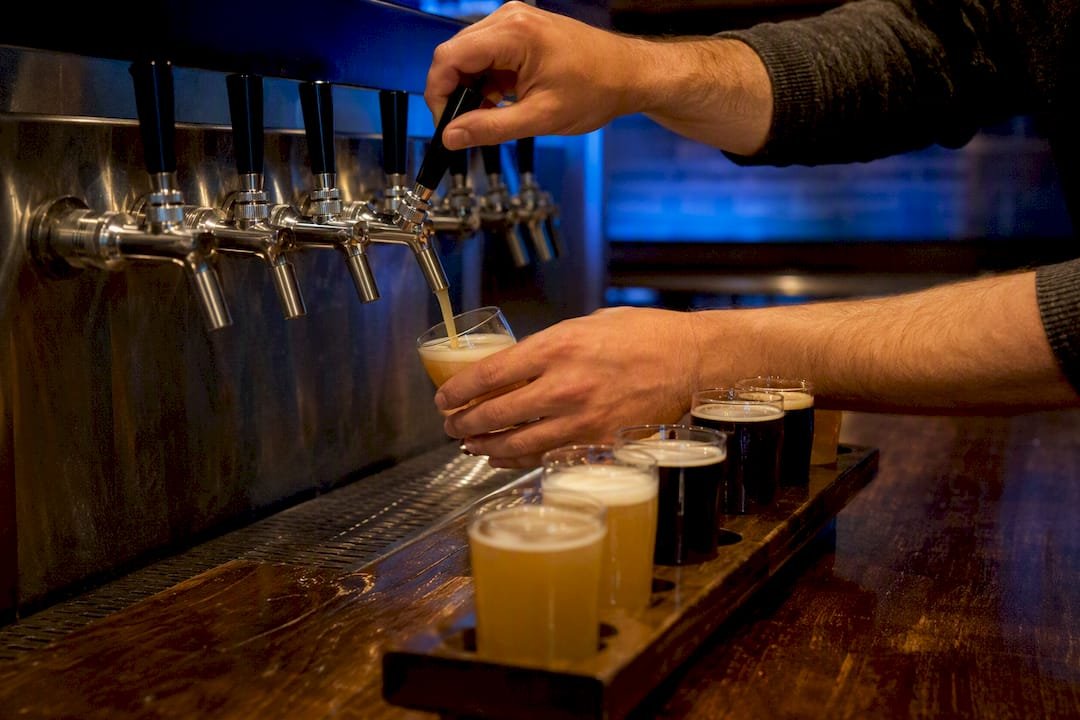
Pour technique matters too. Tilt your glass at an angle and pour slowly. That single habit prevents most of the foam problems people blame on the tap itself. If you’re not sure how it feels, flag down a Tap Ambassador. A quick demo pour of an ounce or two shows you exactly how the valve responds before you commit to anything bigger.
A few ways to make your visit go further:
- Build a flight of 2 to 3-ounce pours before committing to a full glass of any one beer
- Set a mental spending cap, or ask staff about pre-loading a set amount to your card
- Share small pours with your table so everyone tries more styles for less total cost
- Read the tasting notes and ABV on-screen so you’re not surprised by a stronger pour’s price
Pro Tip: Split a flight with friends. If four people each pour 2 ounces of four different beers, the whole table tastes 16 beers for the price of four full pints.
Pairing Food With Your Self-Pour Flight
Small pours call for small plates. Shareables work better than a single entrée when you’re sampling six or eight different beers, since you want food that keeps pace with a changing glass rather than one flavor locked in for the whole meal.
Some pairing logic that holds up at the tap wall:
- Porter or stout styles, like a Smoke Porter, pair well with smoky meats, barbecue, or a chocolate dessert
- Hoppy ales cut through spicy or fried foods, balancing heat with bitterness
- Lighter lagers and ciders sit nicely alongside salads, seafood, or lighter shareables
Many venues let you place a food order right at check-in, so your first plate arrives while you’re still working through your first flight. Others take orders straight from your table once you’re settled in front of the wall.
Keeping the Tap Wall Clean and Running Right
A self-pour wall only works if every line, valve, and flow meter stays clean, since beer residue builds up fast in warm, humid taproom air. Lines typically get flushed and cleaned on a regular schedule, often weekly, to prevent the sour or “off” flavors that come from wild yeast or bacteria settling in old tubing.
Flow meters need their own attention separate from the beer lines themselves. These small mechanical parts measure every ounce that passes through, and a meter that drifts out of calibration either overcharges or undercharges every pour it touches until someone catches the discrepancy. Staff usually check meter accuracy against a known pour volume on a set schedule, catching small drifts before they become billing headaches.
Faucets get the most hands-on attention because they touch the most surfaces. Staff typically disassemble and sanitize faucet parts daily, since foam residue and yeast buildup on a faucet nozzle affect pour quality faster than almost anything else in the system. CO2 and nitrogen lines get pressure checks too, since inconsistent gas pressure is one of the most common causes of a foamy, wasted pour that has nothing to do with how the guest tilted their glass.
None of this maintenance is visible to you as a guest, but you feel its absence immediately: flat beer, foamy pours, or a tap that just won’t dispense. A well-run wall is one where none of that ever becomes your problem.
How Self-Pour Systems Connect to Point-of-Sale
Every ounce you pour has to land somewhere on your final bill, and that connection between the tap wall and the point-of-sale system is what makes the whole model work. The flow meter on each tap doesn’t just measure volume. It feeds that data straight into the POS in real time, converting ounces poured into dollars owed before you’ve even set your glass down.
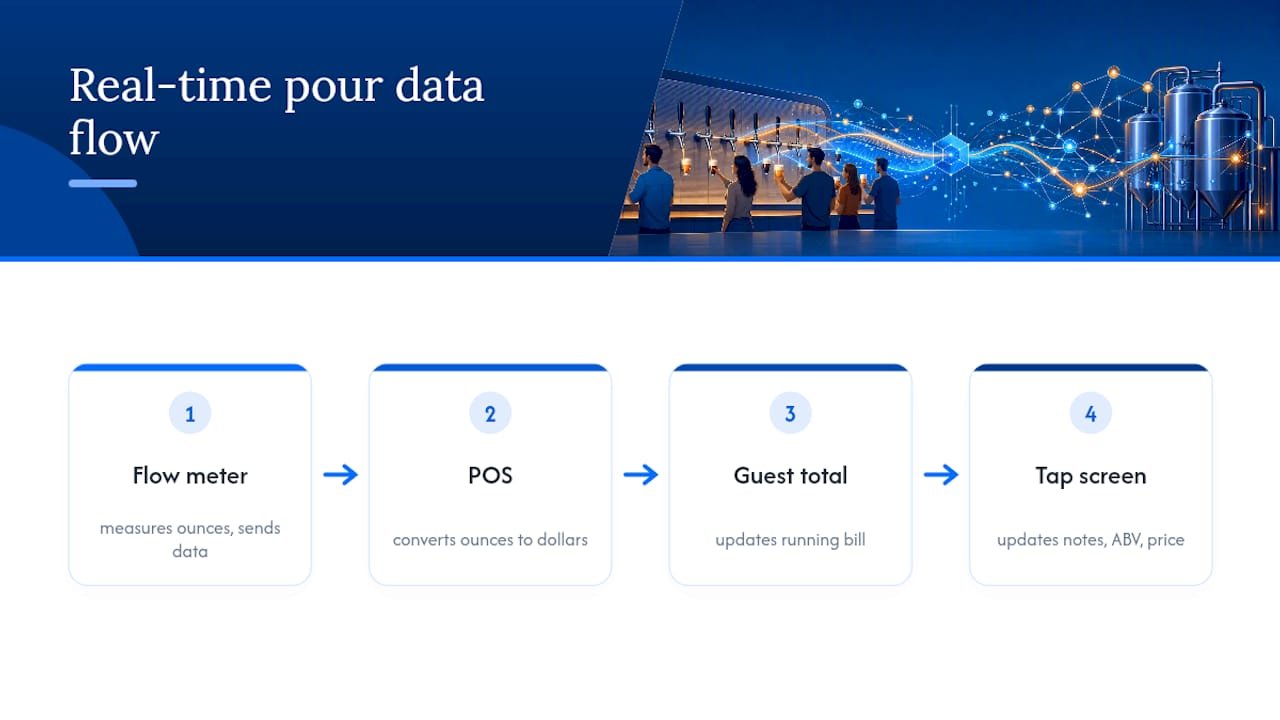
That real-time link is what makes ounce-based billing possible at all. Disconnected systems, where the tap wall and the register don’t talk to each other, create the exact accounting and guest-experience problems venues work hardest to avoid, since a gap between pour data and payment data means someone’s tab doesn’t match what they actually drank.
The same integration also feeds the on-screen tasting notes and ABV info you see above each tap, often pulling data from beer-tracking platforms like Untappd to keep descriptions current as kegs rotate. When a keg changes, the POS updates the screen, the price per ounce, and the tasting notes all at once, so you’re never pouring against outdated information.
What It Takes to Set Up a Self-Pour Wall
Installing a tap wall involves more than mounting faucets to a board. Each tap needs its own flow meter and control valve wired into a central system that tracks every pour against a guest’s card in real time. That means running data cabling alongside the beer lines themselves, not just plumbing for beer and gas.
The tap wall also needs a reliable network connection, since every pour, price update, and payment authorization depends on the system talking to a central server without lag. A spotty connection doesn’t just slow things down. It can leave a tap unresponsive right as a guest tries to pour.
Refrigeration and line length matter just as much as the technology layer. Beer lines have to stay cold from keg to faucet, and poor temperature control leads to foamy pours no matter how well the flow meter is calibrated. Getting the technical build right up front saves a venue from chasing foam complaints for months afterward.
Common Tap Wall Problems and Quick Fixes
Most self-pour hiccups fall into a handful of predictable categories, and staff are trained to spot them fast.
A foamy pour is usually the most common complaint, and it’s rarely the system’s fault. Warm beer lines, incorrect gas pressure, or a guest pouring too fast into an upright glass all produce the same foamy result. Tilting the glass and pouring slower fixes most of it on the spot.
A tap that won’t unlock usually points to a card or wristband issue rather than a broken valve, often solved by a quick tap-and-retry or a staff reset at the counter. A screen showing an inflated or incorrect price per ounce almost always means a keg change hasn’t fully synced yet, something staff can confirm and correct in seconds.
When a dispense limit locks a card mid-flight, that’s the system working exactly as designed. A quick check-in with a Tap Ambassador gets the limit reset once staff confirm everything’s fine.
Why Venues Choose Self-Pour, and Where It Gets Tricky
For a brewpub, the appeal is straightforward. Guests sample more when they control the pour, since ounce-by-ounce billing turns waiting time into exploration time instead of standing in line for a bartender’s attention. That extra sampling often means guests try beers they’d never order as a full pint, discovering a Honey Beer or an unfamiliar cider they’d have skipped otherwise.
Self-pour also reshapes staffing. Instead of pouring drinks all night, staff shift into a Tap Ambassador role, educating guests and monitoring the room, which keeps the social, human side of a taproom alive rather than automating it away. That’s a real counterpoint to the assumption that self-serve technology makes a bar feel colder. Done right, it does the opposite.
The challenges are just as real. Getting the tap wall, POS, and payment systems fully integrated takes real technical setup, and any gap between those systems creates billing headaches fast. Line maintenance, flow meter calibration, and staff training all require ongoing attention, not a one-time setup. And because self-pour alcohol rules vary by state, venues have to stay current on local ABC requirements rather than assuming one setup works everywhere.
The Different Flavors of Self-Pour Technology
Not every self-pour wall works the same way. Some systems are built exclusively around beer, wine, and cider, while others are liquid-agnostic, meaning the same tap wall can pour beer, wine, cocktails, kombucha, and cold brew depending on how the operator configures it.
Card-based systems, using an RFID card or wristband, remain the most common activation method, though some newer setups experiment with app-based tap-to-pay instead of a physical card. The core technology across most systems looks similar: flow meters for measurement, control valves for dispensing, and a connected POS for billing. Where systems really differentiate is in software, specifically how tasting notes, ABV data, and pricing screens integrate with beverage-tracking platforms and how granular the dispense-limit controls are.
For a guest, the technology underneath rarely matters as much as the experience it produces. What you notice is the variety on the wall, how fast the screen updates, and whether a Tap Ambassador is nearby when you have a question.
What We’ve Learned Running a Self-Pour Wall
Most first-time guests assume self-pour means less staff interaction, and that assumption is backwards. The Tap Ambassador role at Space Brewpub’s beer wall actually creates more one-on-one moments than a traditional bar, since staff aren’t stuck pulling pints for a line of people. They’re free to walk the wall, answer questions, and show someone how to angle a glass for a Smoke Porter without foam taking over half the pour.
Dispense limits get a bad reputation before people understand them. They’re not about restricting a good time. They’re a safety check that lets staff step in, confirm everyone’s doing fine, and reset the card so the night continues. Paired with a celestial-themed room and global-meets-pub-classic menu, the self-pour format turns a bar visit into something closer to a tasting event than a transaction.
— Manu
Reserve Your Table for a Self-Pour Tasting Night
Space Brewpub is the alternative to a standard night out at a crowded bar: no waiting for a bartender’s attention, no committing to one full pint before you know if you like it. Pour your own flight across 20+ taps, from a Honey Beer to a Dry Stout, pair it with shareables from the menu, and settle in on the pet-friendly patio when the weather’s right.
Browse the beer wall before you arrive so you already have a shortlist, check the food menu for pairing ideas like the Smoke Porter alongside something smoky, and bring the group. If you’re planning a birthday, a get-together, or any gathering bigger than a table of two, ask about event and group hosting when you book. Ready to skip the line and start pouring? Reserve your table and pick your first flight when you arrive.
Sources
- 5 reasons why self pour is the solution for your business — PourMyBeer
- Self-pour taproom — Tabski
- The Tap Ambassador: Helping Create an Amazing Self-Pour Experience — The Table Tap
FAQ
How Does a Self-Pour Beer Tap Work?
You link a payment card to an RFID wristband or card at check-in, then tap it at any faucet to unlock the pour. A flow meter measures each ounce and bills your tab in real time.
Is Self-Pour Beer Cheaper Than Ordering at the Bar?
It depends on how much you pour. Ounce-based pricing lets you taste small amounts across many beers, often costing less than several full pints while letting you sample far more variety.
What Happens if I Hit My Pour Limit?
Most systems cap dispensing around 32 to 64 ounces per card as a safety measure. A staff member checks in with you before resetting the limit so you can keep pouring.
Does Space Brewpub Offer Self-Pour Beer?
Yes. The venue’s tap wall features 20+ self-pour options, including beer, wine, and cider, viewable in full on the beer menu before you visit.
Can I Reserve a Table in Advance?
Yes, tables can be reserved directly through Space Brewpub’s booking page, and walk-ins are welcome depending on availability.